

Tomcat 8 es la nueva versión de este Servidor Web JEE, que por méritos propios se ha convertido sin duda en el estándar de facto para entornos de desarrollo, además de ser el core de productos como JBoss Web Server o TC Server.
Tomcat 8 está alineado con Java EE 7, además usa las especificaciones Servlet 3.1, JSP 2.3, Expression Language 3.0, WebSocket 1.0.
Tomcat 8 sólo funcionar con la JDK 1.7.
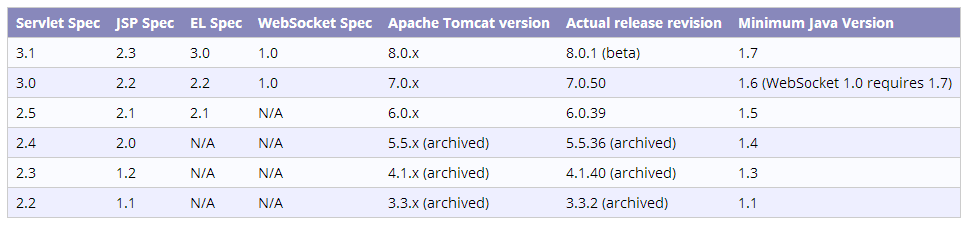
Especialmente interesante es la inclusión de API WebSocket 1.0, de SPDY y el uso de NIO como conector por defecto para HTTP y AJP.
La última versión estable es la 8.0.0, aunque ya está en beta la 8.0.1.
A nivel de uso algunas funcionalidades/novedades interesantes son:
· Soporte WebSockets: http://tomcat.apache.org/tomcat-8.0-doc/web-socket-howto.html
· Recursos JNDI: http://tomcat.apache.org/tomcat-8.0-doc/jndi-resources-howto.html
· Pool JDBC de alto rendimiento: http://tomcat.apache.org/tomcat-8.0-doc/jdbc-pool.html
· En la documentación está descrita de forma clara y concisa cada característica:
· Introduction – A brief, high level, overview of Apache Tomcat.
· Setup – How to install and run Apache Tomcat on a variety of platforms.
· First web application – An introduction to the concepts of a web application as defined in the Servlet Specification. Covers basic organization of your web application source tree, the structure of a web application archive, and an introduction to the web application deployment descriptor (/WEB-INF/web.xml).
· Deployer – Operating the Apache Tomcat Deployer to deploy, precompile, and validate web applications.
· Manager – Operating the Manager web app to deploy, undeploy, and redeploy applications while Apache Tomcat is running.
· Realms and Access Control – Description of how to configure Realms (databases of users, passwords, and their associated roles) for use in web applications that utilize Container Managed Security.
· Security Manager – Configuring and using a Java Security Manager to support fine-grained control over the behavior of your web applications.
· JNDI Resources – Configuring standard and custom resources in the JNDI naming context that is provided to each web application.
· JDBC DataSource – Configuring a JNDI DataSoure with a DB connection pool. Examples for many popular databases.
· Classloading – Information about class loading in Apache Tomcat, including where to place your application classes so that they are visible.
· JSPs – Information about Jasper configuration, as well as the JSP compiler usage.
· SSL – Installing and configuring SSL support so that your Apache Tomcat will serve requests using the https protocol.
· SSI – Using Server Side Includes in Apache Tomcat.
· CGI – Using CGIs with Apache Tomcat.
· Proxy Support – Configuring Apache Tomcat to run behind a proxy server (or a web server functioning as a proxy server).
· MBean Descriptor – Configuring MBean descriptors files for custom components.
· Default Servlet – Configuring the default servlet and customizing directory listings.
· Apache Tomcat Clustering – Enable session replication in a Apache Tomcat environment.
· Balancer – Configuring, using, and extending the load balancer application.
· Connectors – Connectors available in Apache Tomcat, and native web server integration.
· Monitoring and Management – Enabling JMX Remote support, and using tools to monitor and manage Apache Tomcat.
· Logging – Configuring logging in Apache Tomcat.
· Apache Portable Runtime – Using APR to provide superior performance, scalability and better integration with native server technologies.
· Virtual Hosting – Configuring virtual hosting in Apache Tomcat.
· Advanced IO – Extensions available over regular, blocking IO.
· Additional Components – Obtaining additional, optional components.
· Using Tomcat libraries with Maven – Obtaining Tomcat jars through Maven.
· Security Considerations – Options to consider when securing an Apache Tomcat installation.
· Windows Service – Running Tomcat as a service on Microsoft Windows.
· Windows Authentication – Configuring Tomcat to use integrated Windows authentication.
· High Concurrency JDBC Pool – Configuring Tomcat to use an alternative JDBC pool.
· WebSocket support – Developing WebSocket applications for Apache Tomcat.


 Un poco de Java
Replica a Luis Miguel Gracia Luis Cancelar la respuesta