
Hadoop ofrece el comando hadoop fs para operar sobre el Filesystem HDFS.
En otros casos podemos necesitar acceder a HDFS desde nuestros programas Java.
Por suerte existe un API sencilla para esto.
1) Creamos un proyecto con estas dependencias (para Hadoop 1.1.1)

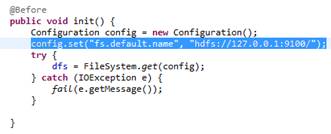
2) Para inicializar el FS:
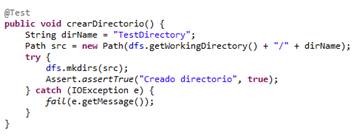
3) Para crear Directorio:
4) Creamos fichero HDFS y escribimos en él:

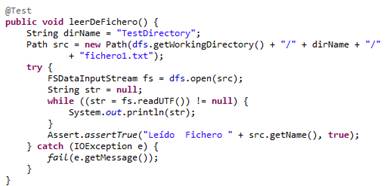
5) Leemos de fichero:
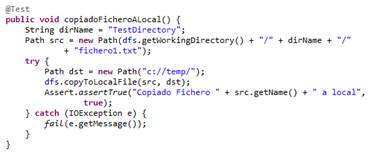
6) Copiamos fichero a nuestro FS local:
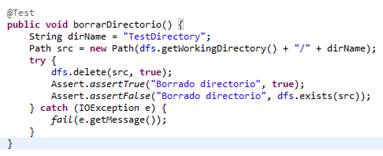
7) Borramos directorio:
Ahí va el listado completo por si os es de utilidad alguna vez J
| import static org.junit.Assert.fail;
import java.io.IOException; import java.util.UUID; import junit.framework.Assert; import org.apache.hadoop.conf.Configuration; import org.apache.hadoop.fs.FSDataInputStream; import org.apache.hadoop.fs.FSDataOutputStream; import org.apache.hadoop.fs.FileSystem; import org.apache.hadoop.fs.Path; import org.junit.Before; import org.junit.Test; public class TestOperacionesHDFS { private FileSystem dfs = null; @Before public void init() { Configuration config = new Configuration(); config.set("fs.default.name", "hdfs://127.0.0.1:9100/"); try { dfs = FileSystem.get(config); } catch (IOException e) { fail(e.getMessage()); } } @Test public void listOptios() { try { System.out.println("Working Directory:" + dfs.getWorkingDirectory().getName()); System.out.println("Default Block Size:" + dfs.getDefaultBlockSize()); System.out.println("Default Replicatione:" + dfs.getDefaultReplication()); System.out.println("Name:" + dfs.getName()); Assert.assertTrue("Working Directory=" + dfs.getWorkingDirectory().getName(), true); } catch (Exception e) { fail(e.getMessage()); } } @Test public void crearDirectorio() { String dirName = "TestDirectory"; Path src = new Path(dfs.getWorkingDirectory() + "/" + dirName); try { dfs.mkdirs(src); Assert.assertTrue("Creado directorio", true); } catch (IOException e) { fail(e.getMessage()); } } @Test public void crearFicheroYEscribir() { String dirName = "TestDirectory"; Path src = new Path(dfs.getWorkingDirectory() + "/" + dirName + "/" + "fichero1.txt"); try { dfs.createNewFile(src); FSDataOutputStream fs = dfs.create(src); fs.write("Primera Linea".getBytes()); for (int i = 0; i < 1000; i++) { fs.write(UUID.randomUUID().toString().getBytes()); } fs.write("Ultima Linea".getBytes()); fs.close(); Assert.assertTrue("Creado Fichero " + src.getName(), true); } catch (IOException e) { fail(e.getMessage()); } } @Test public void leerDeFichero() { String dirName = "TestDirectory"; Path src = new Path(dfs.getWorkingDirectory() + "/" + dirName + "/" + "fichero1.txt"); try { FSDataInputStream fs = dfs.open(src); String str = null; while ((str = fs.readUTF()) != null) { System.out.println(str); } Assert.assertTrue("Leído Fichero " + src.getName(), true); } catch (IOException e) { fail(e.getMessage()); } } @Test public void copiadoFicheroALocal() { String dirName = "TestDirectory"; Path src = new Path(dfs.getWorkingDirectory() + "/" + dirName + "/" + "fichero1.txt"); try { Path dst = new Path("c://temp/"); dfs.copyToLocalFile(src, dst); Assert.assertTrue("Copiado Fichero " + src.getName() + " a local", true); } catch (IOException e) { fail(e.getMessage()); } } @Test public void borrarDirectorio() { String dirName = "TestDirectory"; Path src = new Path(dfs.getWorkingDirectory() + "/" + dirName); try { dfs.delete(src, true); Assert.assertTrue("Borrado directorio", true); Assert.assertFalse("Borrado directorio", dfs.exists(src)); } catch (IOException e) { fail(e.getMessage()); } } } |
 Un poco de Java
Deja un comentario